Hello,
I’m trying to understand when are calculated dates of assignments associated to a task. In the default’s mode, the start and end dates should align with the task ones.
I’m having an issue with the re-calculated dates of assignments associated to a task. Those assignment’s mode is “default”, so the start and end dates should align with the task ones.
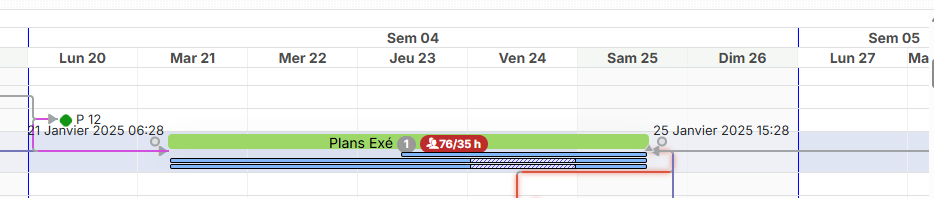
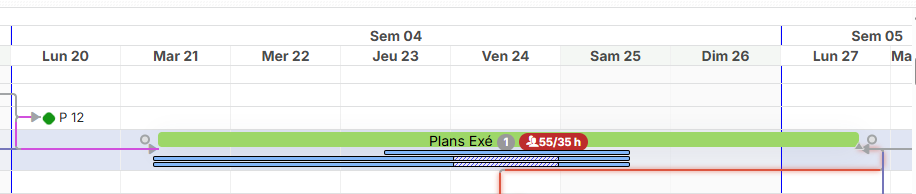
When dragging the task, I can see the associated assignments moving accordingly, whith the same start and end dates. But when I release the clic, the task dates are adjusted according to the calendar, but not the assignments. Eg. in this exemple (baseline shows assignments. Ignore the first “short” one) :
1- While dragging the task, all the assignments are following the same start/end dates (even if the end date corresponds to a weekend)
Question :
When are the assignment dates re-calculated ? I can see that the task is graphicaly adjusted in the “_finalize_mouse_up” function (while calling “gantt.updateTask(task.id)”) in tasks_dnd.js. But nothing seems adjusted for the corresponding assingments.
Thanks for your help.
Hello Nickeau,
The resource assignments and their rows in the timeline should be updated correctly. But because of a bug, the task assignments (task rows in the resource timeline) are not repainted after drag.
If you trigger a repaint method, you can see that they are updated correctly:
You can also update them manually during the drag to immediately see the changes, but this may affect performance:
gantt.attachEvent("onTaskDrag", function (id, mode, task, original) {
    gantt.getDatastore("resource").refresh()
});
You can check how it works in the following snippet:
The dev team will fix the bug in the future, but I cannot give you any ETA.
If you have a different use case, please add your configuration to the snippet above and make sure that the issue is reproduced there. Then click on the Save button and share the link.
Thanks for your answer.
Actually, my problem seems not to be about the display. The assignments in the resource timeline are aligned with the visible baseline.
My problem is at the “data” level.
During the task drag, the assignment dates are adjusted accordingly, even in the task object (in JS). But when releasing the clic, the task dates are adjusted according on the calendar, but not the assignment ones.
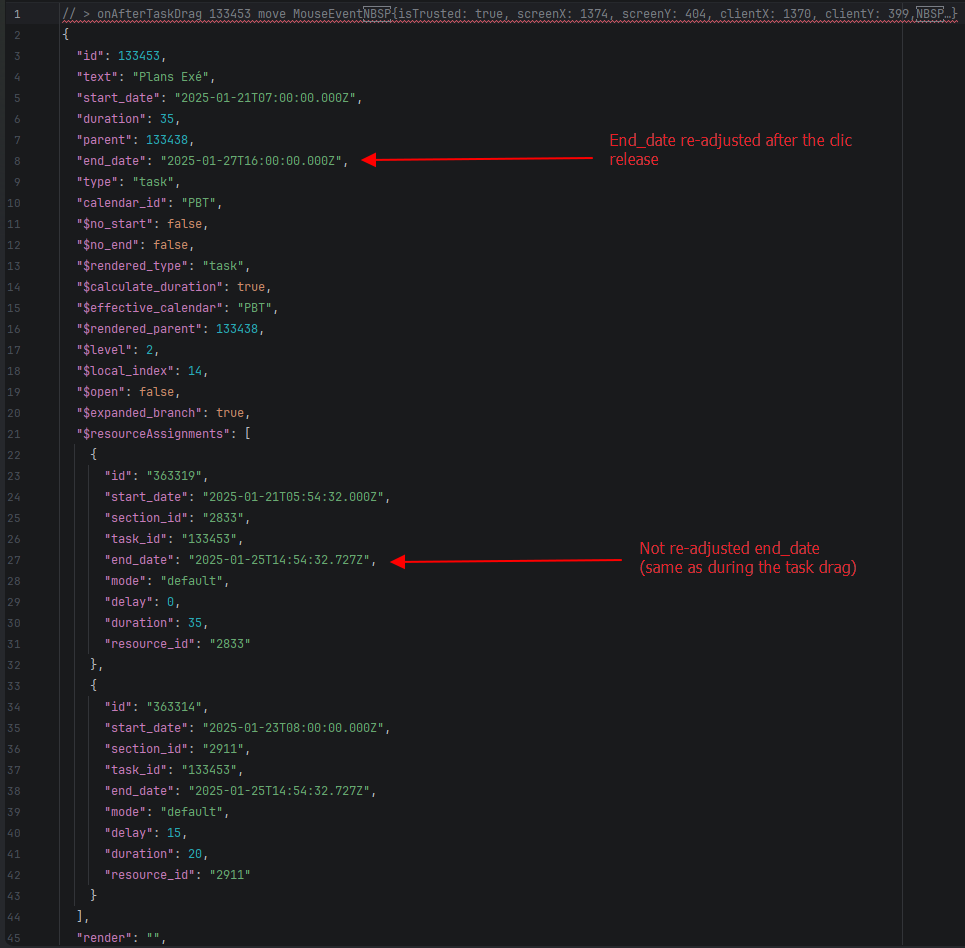
Here is the dump of the task object, as seen in the “onAfterTaskDrag” event. We can see that the task end_date is well adjusted according to the calendar, but the corresponding assignments end dates have not been changed.
Hello Nickeau,
Thank you for the clarification.
Unfortunately, I cannot reproduce the issue in the snippet I shared even without using the workaround and after switching the Gantt versions.
So, the issue can be related to a custom code that updates the tasks or assignments, or there is some specific Gantt configuration. But as I don’t see the full Gantt configuration and cannot reproduce the issue locally, it is hard to suggest what might be wrong.
You can try to reproduce the issue in the snippet with the minimal configuration from your application. And after you are able to do that, you can share the snippet.
I actually couldn’t reproduce the issue either in the snippet. I agree it may come from my custom code and will investigate further.
Do you have any idea where (in dhtmlx.js) the assignments dates are re-calculated after the task dates have been adjusted according to the calendar ? It may be of much help.
I will keep in touch if I can find a way to reproduce the issue in the snippet (but my app is quite big and complicated).
Thanks again
Hello Nickeau,
The assignments are recalculated in the _syncAssignments function. It is called in the _syncOnTaskUpdate function that is called in the onAfterTaskUpdate event handler:
gantt.attachEvent("onAfterTaskUpdate", function (id, item) {
	if(batchUpdate){
		needUpdate = true;
		needUpdateFor[id] = item;
	}else if (!item.unscheduled){
		_syncOnTaskUpdate(item);
	}
});
So, if you cancel some updates or run your code inside the silent method, the update events are not called, so it is expected for Gantt to not recalculate the assignments.
You can also try to collect your configuration by copying the function from the snippet and running in your application:
Then you can load the file in the snippet and check if the issue is reproduced in the snippet. But there is no way to collect custom functions and use the event handlers, so this approach won’t help in this case.