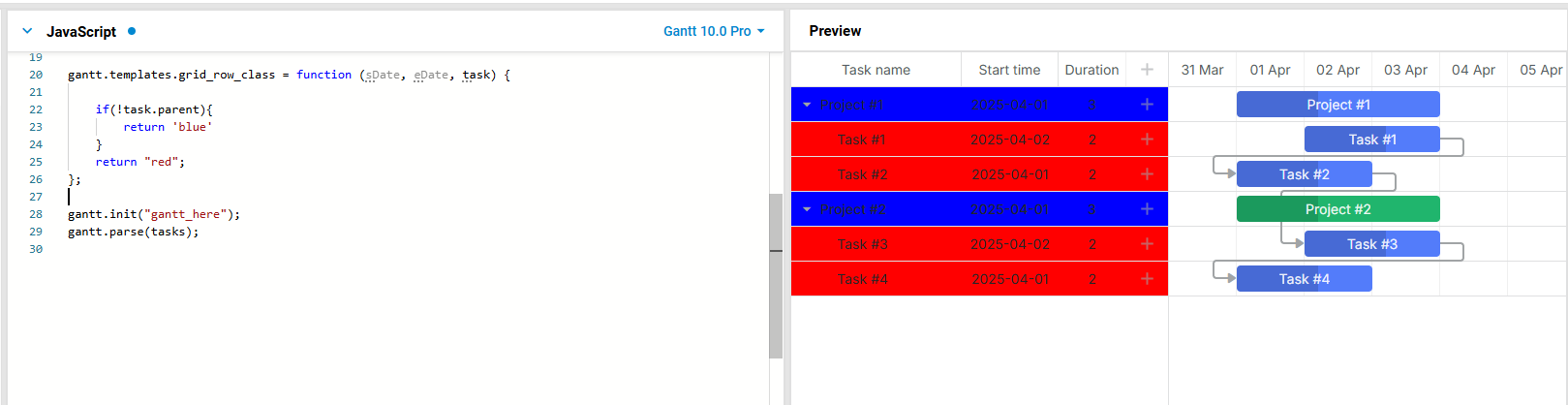
I’m trying to add background color to the parent task rows using task_row_class template. However the class is only applied to parents in the gantt_row(left panel rows) but not to gantt_task_row(right panel rows) as shown in the image below.
Hello Pavi,
If you add the task_row_class template, it should be applied to the task rows in the timeline.
Here is an example with the simple configuration:
If it doesn’t work, most likely, it is related to custom style configuration or Gantt configuration.
But as I don’t see your case, it is hard to suggest what might be wrong.
Please add your configuration to the snippet and make sure that the issue is reproduced there. Then, click on the Save button and send me the link.
Or send me a ready demo with all the necessary JavaScript and CSS files so that I can reproduce the issue locally.
Thank you for your reply. Unfortunately this did not work. The class names did not set on any task row for some reason. Maybe it has to do with my config. Since I only wanted to show a colour if a parent task(s) is expanded thought I’d need something more custom and built the following:
Hello Pavi,
Is it not recommended to modify the DOM structure in DHTMLX Gantt because of the way it renders the data. When a repaint occurs, Gantt removes the existing HTML elements and creates new ones. So, all the changes you added will be lost next time Gantt repaints the data. The approach you tried works only in some scenarios, but it won’t work in other scenarios. For example, while you drag or resize tasks, the styles will return to default ones: https://files.dhtmlx.com/30d/3ed0d65769740b3a2a9475c07d5e1df2/vokoscreen-2026-07-27_10-54-19.mp4
If you tried to use the onTaskDrag event handler, the rows would flicker and switch between the default styles and custom styles because of multiple repaints. Also, this approach degrades performance.
So, instead of modifying the DOM structure, it is recommended to use the templates. This way it works as designed, and you don’t need to try to make it work the way it is not supposed to.
The templates may not work in your case, if you add multiple template definitions. In this case, the latest template overwrites all other template declarations.
Here is an example:
The templates also allow you to check the task object. You can use the $open property to return the class name only for the expanded tasks: Task Properties | DHTMLX Gantt Docs.
With the concern you raised I went through the code and found a broken config edit from my end which after fixing fixed both row and task class bindings using templates.
Thank you.
Get a guaranteed answer from DHTMLX technical support team
under the most suitable support plan