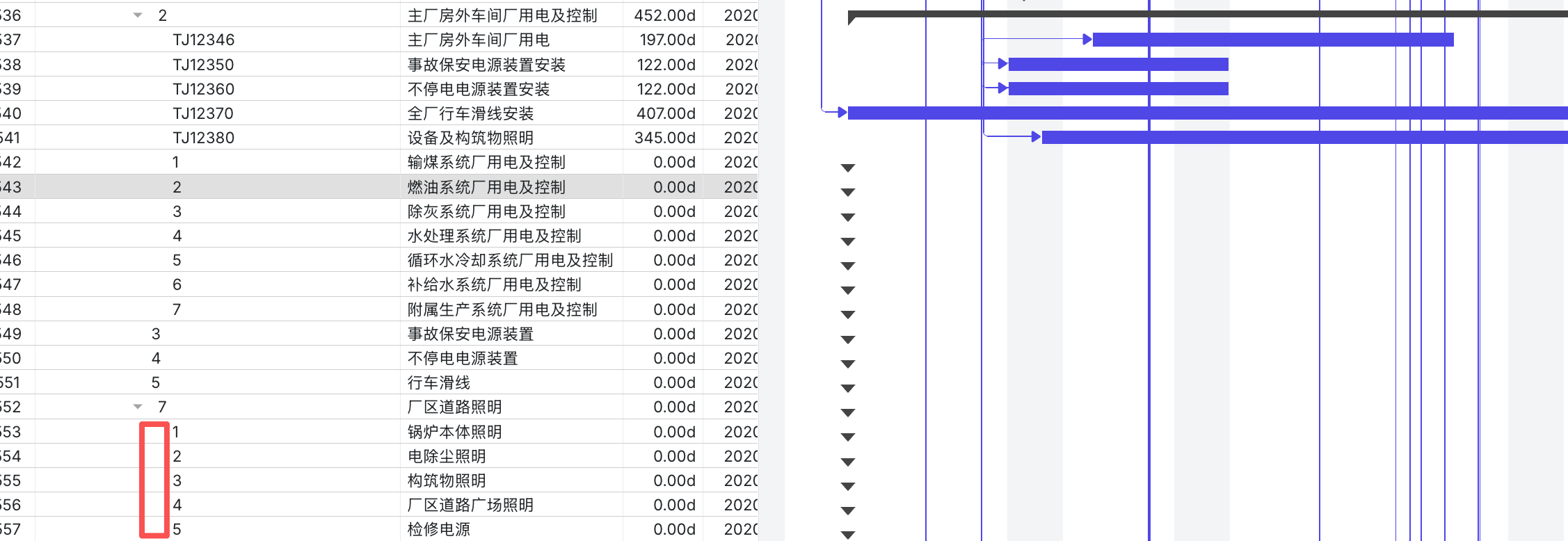
I found a problem, when there are more levels of the tree, the icon corresponding to the project in front is gone, as shown in the figure above, I don’t know which level the icon shows support, and whether there is any optimization
Hello @wqh,
Thank you for the provided details.
It’s an expected behavior. The tree icons disappear when there are many nesting levels because each tree level adds a 15px indent, plus 20px for the expand/collapse icon. When the total width of indents and icons exceeds your column width, the icons get clipped due to CSS overflow: hidden on the cell. If you have a lot of nesting levels, try increasing the column width to leave enough space for the content inside this column. You can use the width and min_width properties to specify the desired width for a specific column.
Here’s an example with multiple nesting levels: DHTMLX Snippet Tool.
You can also try to create custom columns in the grid and display open/close buttons inside them:
gantt.config.columns = [
    {
      name: "open_button", label: "Open/close button", align: "center", width: 80, template: (task) => {
          if (gantt.hasChild(task.id)) {
              if (task.$open) return "<i class='gantt_tree_icon gantt_close'><i class='fa fa-angle-down '></i></i>";
              else return "<i class='gantt_tree_icon gantt_open'><i class='fa fa-angle-right '></i></i>"
          };

          return '';
      }
    },
    // other columns
];
And attach the onTaskClick event to check whether an open/close button is clicked and therefore expand/collapse the task tree:
gantt.attachEvent("onTaskClick", function (id, e) {
    if (e.target.closest(".open_button")) {
        const task = gantt.getTask(id)
        if (task.$open) {
            gantt.close(task.id)
        }
        else {
            gantt.open(task.id)
        }
    }
    return true;
});
Then apply the following CSS styles:
.fa {
  cursor: pointer;
  font-size: 18px;
  text-align: center;
  padding-top: 8px;
}

.fa-angle-right {
  color: #328EA0;
}

.fa-angle-down {
  color: #328EA0;
}

.gantt_tree_icon.gantt_close,
.gantt_tree_icon.gantt_open {
  background: rgba(2, 2, 2, .01);
}

.gantt_tree_icon.gantt_close::before,
.gantt_tree_icon.gantt_open::before {
    content: unset;
}
Related article on how to create a custom column: How-tos | DHTMLX Gantt Docs
Here’s a complete example: DHTMLX Snippet Tool.
Best regards,
Valeria Ivashkevich
DHTMLX Support Engineer