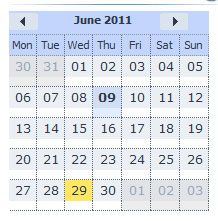
I am integrating a full featured calendar but very small, like a minical but with full event adding facility etc (as mincal on its own does not support this). As per the attached image, the scaling is no problem, BUT I would like the day cells to look like those in year view or minical: date in center of cell, entire cell clickable. How would I do that? Currently only the very small area below the dates is clickable…
Check out scheduler/samples/05_calendar/05_plain_structure.html sample:
		var calendar = scheduler.renderCalendar({
			container:"cal_here",
			navigation:true,
			handler:function(date){
				scheduler.setCurrentView(date, scheduler._mode);
			}
		});
Notice the handler function which is executed when you click on a date (it’s possible to change source code so it will be executed on a double click).
also, the calendar I attached a screenshot of is NOT a minical, it is just a very small regular calendar. If the handler code for a minical can be made to create a new event (opening the lightbox) with the date passed through, then that would be very good.
scheduler.addEventNow({
    text: "Event name",
    start_date: new Date(2011,5,13),
    end_date: new Date(2011,5,14)
});
That code will display lightbox to add event.
      var calendar = scheduler.renderCalendar({
         container:"cal_here",
         navigation:true,
         handler:function(date){
            scheduler.addEventNow({
    		text: "Event name",
    		start_date: new Date(date),
    		end_date: new Date(date)
		});
         }
      });
what I’m trying to achieve is that the start_date and end_date take the date that is clicked on from the minical. does not seem to work as expected. any ideas? I assume I can use all my custom lightbox settings etc in scheduler.config?